How to Select Multiple Fields on a Form Page
Select all/ multiple fields on a form
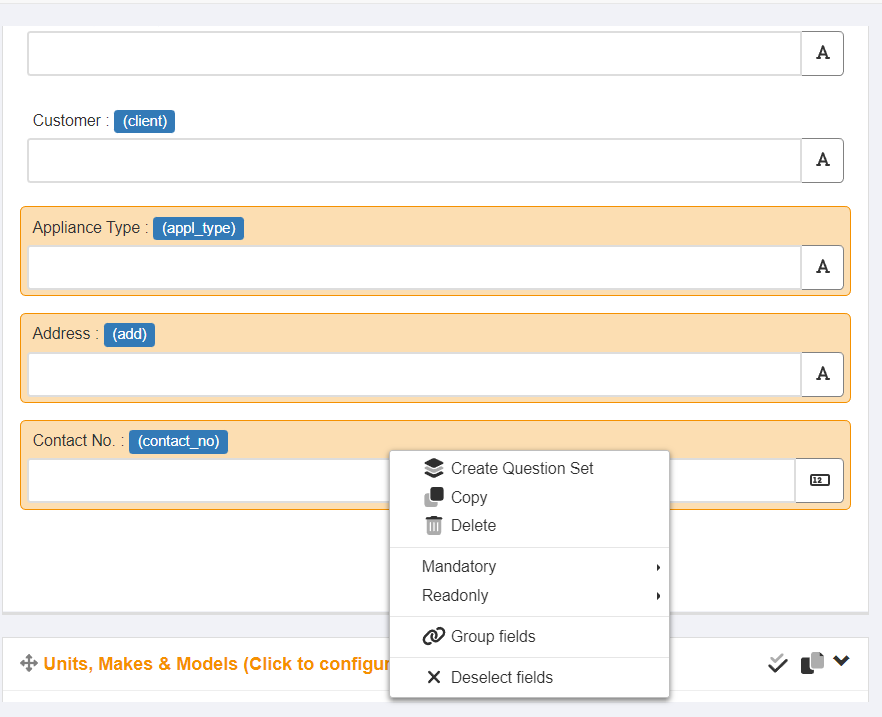
One or more form fields on a page can be selected when using the Build option. This can useful for a number of reasons, including to :
- move the selected fields to a different location on the page or to a different page.
- create a Question Set or Field Group using the selected fields.
- set the fields to be mandatory or read-only.
- delete the fields.
- copy the fields.
To select more than one field :
- hold down the control key (Ctrl on a windows keyboard) on your keyboard, click once on each of the fields you want to select.
- this will highlight each field to indicate they have been selected.
- when finished selecting fields, release the control key.
- right click your mouse to display a menu of actions.
- perform the action(s) you require.
Article ID: 11
Created: August 25, 2022
Last Updated: August 25, 2022
Author: Administrator
Online URL: https://www.pro-forms.co.uk/kb/article.php?id=11