Troubleshooting: Triggers Not Running
Triggers not running
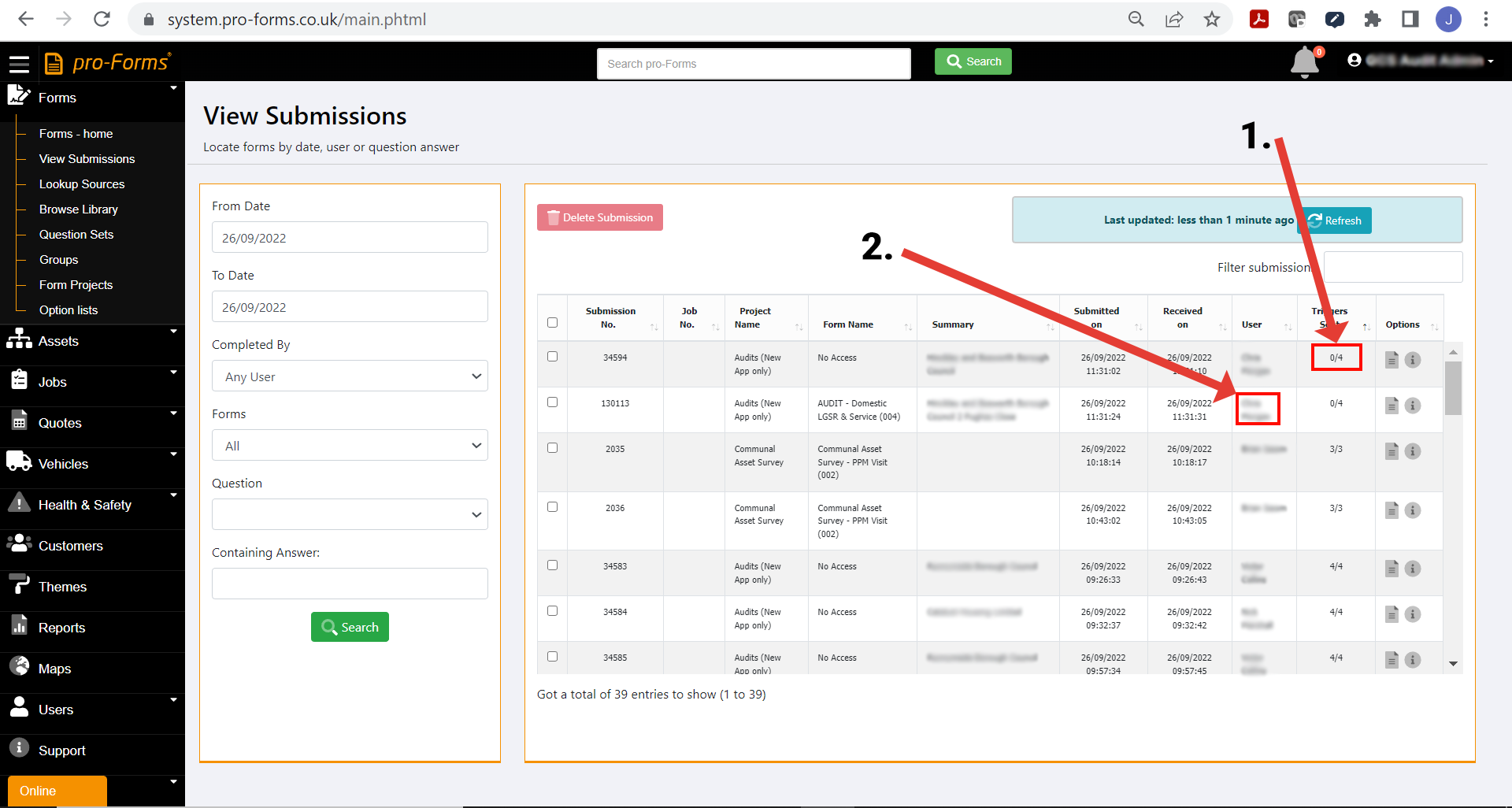
One of the most common questions we are asked is why Triggers haven’t, or appear not to have run. The way to tell if a Trigger has run or not is by looking at the View Submissions option and ’Triggers Sent’ (see item 1. in image below) column from ’Forms - home’ menu.
Here is a compilation of the usual responses we give to Customers :-
- Triggers are scheduled to run (i.e. carry out the actions set in the ’Sharing’ option such as send an email) every 5 minutes on the 0 and 5 minutes of every hour e.g. 5 past, 10 past the hour etc.
Sometimes Customers think Triggers are sent instantly as a form arrives into the system and contact us before waiting for the 5 minutes to elapse and the time to reach the next run point. Please ensure sufficient time has passed before contacting us.
- Have all the images captured and sent with a form arrived into the system? If not, the Trigger will not run until they have arrived as ’the form’ i.e. answers to questions images is deemed incomplete. To see if all the images for a form have arrived click on the page icon on the right at the end of the row in the ’Options’ column for a form in the View Submissions table.
Click on the ’Images’ link in the first panel and the page will scroll to the images section. This will show 2 numbers in the form of (2 / 3). The first number is how many images have been received with the form and the second number is how many images the system is expecting to receive for that form.
If there are some images still waiting to be received into the system there some things you can do :-
- If the field worker is using an Android device, in the panel mentioned above where you see the number of images received v the number expected, click the 'Request unsent images from Device' button. The system will then attempt to make contact with the device when it is next online and force it to send the unsent images.
- ask the field worker that sent the form to log out of the app and sign back in using their username and password. This will force the queue mechanism in the pro-Forms app to re-start which will in turn force the app to send any unsent images.
- ask the field worker to tap on the 'Send Log' option in their pro-Forms app and then locate the form and tap on it. This will give them an option to send/ resend any images.
- check that the device actually has a live internet connection to be able to send forms and images.
You will know which field worker sent the form with triggers that haven't run from the 'User' column in the View Submissions table - see item 2. in image below.
- Check if the email address or other location specified for the Trigger in Sharing is valid. Are there any typos in an email address or a space at the end? If the Trigger is to send to OneDrive or other cloud storage system are the parameters set e.g. folder or folder permissions still valid?
Article ID: 30
Created: September 26, 2022
Last Updated: September 29, 2022
Author: Administrator
Online URL: https://www.pro-forms.co.uk/kb/article.php?id=30