Asset Management Software UK — Asset Tracking, PPM & Compliance in One Platform
pro-Forms® ENTERPRISE ASSET MANAGER is enterprise asset management software (also known as a CMMS — Computerised Maintenance Management System) built for the UK — a single, scalable cloud solution that maximises the usability, lifespan and value of assets for:
- Asset Owners
- Building Occupiers
- Asset Managers & surveyors
- Equipment Manufacturers (OEM)
Escape the spreadsheet trap with physical asset management software UK organisations already trust — combining cloud, AI, NFC and QR code asset tracking to manage your plant, equipment and building assets.
PRICE: Base Plan £500/ year
With options to add the mobile app or full field service management, our enterprise asset management software doubles as asset maintenance software, making routine and ad-hoc asset checks, tests, servicing and regulatory compliance a breeze for asset owner teams of all sizes and industries.
Table of Contents
Enterprise asset management software UK teams rely on — throughout the entire asset lifecycle
As asset owner software, ENTERPRISE ASSET MANAGER covers the full asset lifecycle — from acquisition, commissioning & installation, through daily usage, planned maintenance and compliance checks, to disposal — with a single asset register held securely in UK data centres.
Just some of our asset management software users…



Asset Management Software Features
Escape the spreadsheet trap
With all the features required to track company assets from acquisition, commissioning & installation, during their daily usage and compliance checks through to disposal, our UK hosted enterprise asset management software has it covered.
The Base Plan provides web based asset management with online forms. You can choose, if you wish, to add:-
Option A – Mobile app & digital forms with the latest AI powered camera asset identification and digital forms, OR
Option B – WORK MANAGER, full field service management including AI powered scheduling & route optimisation.
The Base Plan plus either Option includes:-
> Unlimited web admin users, assets & asset types
> Unlimited Online forms
> Optional Mobile app or Field Service Management
> Integrations & connectors
> Set-up, configuration & training
> GDPR compliant with UK data residency
What’s the best solution for me and my team?
“I am an FM professional and want to manage our office assets from my laptop at my desk and want to know when equipment needs testing and which assets are in each room/area.”
SOLUTION
ENTERPRISE ASSET MANAGER Base Plan.
REASON
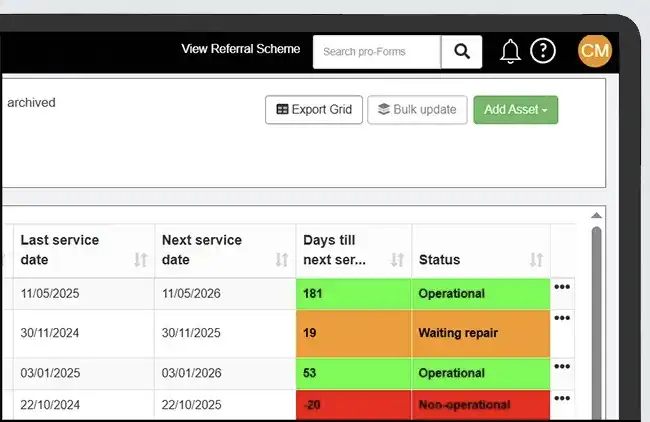
This is browser-based, allows unlimited assets, users and web forms. You can set a calendar of test dates with visual count down and reminders as well as assigning assets to specific locations e.g. a room number within your office.
You will also be able to move assets between locations as well as recording key information such as warranty start/end and storage of documents such as manuals & test certificates.
“We have a team of air conditioning service & repair engineers carrying out PPM and reactive works contracts at our Customers’ premises on their installed equipment.”
SOLUTION
Base Plan + Option B (WORK MANAGER)
REASON
Combining asset management with our WORK MANAGER field service solution will help give engineers the full visibility of each asset & the ability from the mobile app to keep information in the asset register up to date. Scan QR codes or NFC tags to identify assets held in the asset register or use AI powered camera technology to identify and add new assets.
WORK MANAGER will deliver AI optimised job schedules and routes along with the relevant job forms pre-populated with accurate asset details.
“I run a construction company and we have our own plant & equipment and some hired-in items. We move plant from our depot to various sites. We need to keep track of what is where and record their compliance safety checks.“
SOLUTION
Base Plan + Option A (Mobile app & digital forms)
REASON
This combination lets you store all your own and hired equipment assets of all types e.g. diggers, mixers, rollers and scaffolding. On-hire & off-hire dates can be stored against hired assets.
Using the mobile app on-site you can complete hire delivery & collection forms and add photos & signatures. Also you check-in and check-out people and plant from sites and complete safety & compliance forms to a pre-set calendar of dates.
If you are unsure what solution best fits for your team try asking our AI assistant PAIGE by describing your requirements below e.g. team of 10 engineers and 3 office staff servicing 2000 customer assets.

Asset register, PPM & asset compliance software features
Whether you need asset register software, QR code asset tracking for plant & equipment, asset compliance testing or planned maintenance software for your PPM schedules, ENTERPRISE ASSET MANAGER has the features and functionality you need.

Option A – Mobile app & digital forms
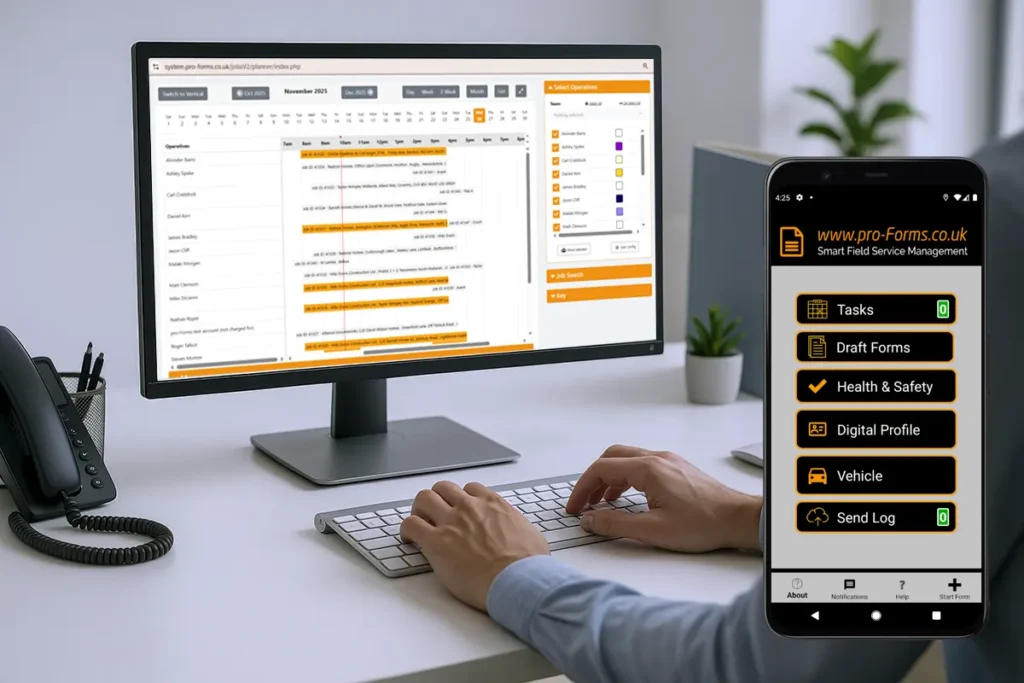
Available on both Android and iOS smartphones & tablets, our asset management app for Enterprise Asset Manager provides all the features to successfully manage your assets on the move and also perform specific compliance checks & tests. The app works in on and off-line modes.
Included in this Option is the Mobile Forms Plan & inspection software to help your field staff complete asset compliance records, condition, installation & commissioning forms, inspections and all the key elements in your asset lifecycle management.
Help your workers quickly identify business assets using the app through the scanning of QR codes, barcodes and NFC tags on your key assets. The app now also includes asset recognition using the latest AI powered camera technology.
This is part of a wider set of AI Field Service Management Software features across pro-Forms® — see everything AI does in the platform.
Option B – WORK MANAGER
This Option adds our WORK MANAGER field service management solution to EAM base Plan.
Adding significant capability to your field service team to carry out both planned and reactive type work on assets, catering for one-off, multi-day and recurring visits by individuals or teams. Now with AI-powered job scheduling & route optimisation— automatically matching the right engineer to the right job based on location and availability — adding Option B gives you smarter control of your field service operation when managing both your own and customers’ assets.
Tag & track your assets
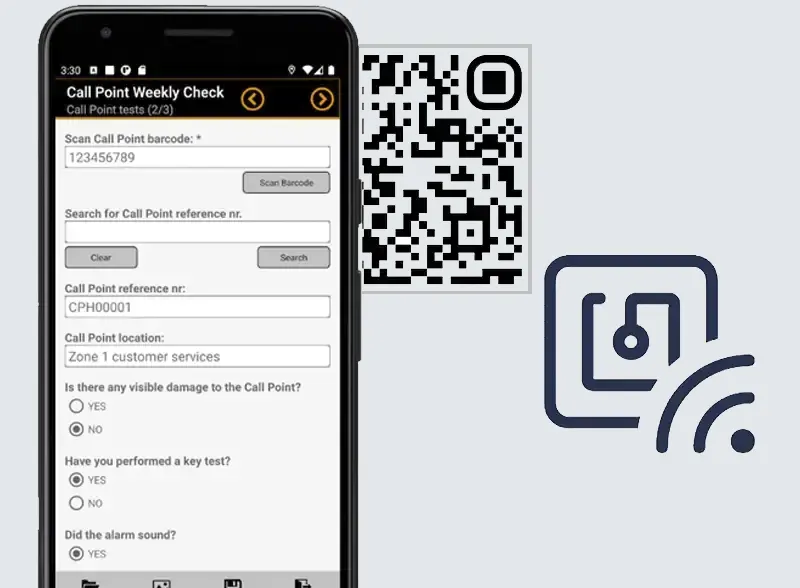
We support several methods for tagging and tracking your assets including QR & barcodes and NFC tags, each designed to meet the needs of different situations and purposes such external/ internal, harsh environmental conditions and static or moveable assets.
Scanning a tag is done using either a mobile form in the mobile app or directly in the asset management app itself.
Who uses this enterprise asset management software?
As dedicated asset owner software, ENTERPRISE ASSET MANAGER is used by organisations across:
> Construction
> Offices/ property
> Building services / fire & security / air conditioning
> Specialist machinery & equipment
> Materials equipment handling (MEH)
> Facilities management
Whether you’re an asset owner managing your own equipment or a facilities team responsible for a building’s compliance, our UK-hosted asset management software gives every team the same real-time view.






Asset Management Software FAQs – pro-Forms® Enterprise Asset Manager.
Clear answers to common questions about our UK-hosted asset management software—covering asset tracking, mobile access, compliance, security, users, pricing structure and more.
Looking for a scalable, secure way to track assets, manage maintenance and stay compliant? These FAQs explain how pro-Forms® Enterprise Asset Manager helps UK organisations build accurate asset registers, run inspections and tests, and access real-time asset data from the office or the field. If you don’t see your question here, contact our team for a quick walkthrough.

Next Steps
If you have specific asset compliance requirements, multiple sites or complex asset hierarchies, we’re happy to help you map Enterprise Asset Manager to your process. Request a demo to see asset tracking, inspections and reporting in action.
How quickly can we get started?
Most teams can get moving quickly. We’ll help you configure asset types, fields and workflows, and provide training so admins and field users can start capturing data immediately. If you already have asset registers in spreadsheets, you can import data to accelerate rollout and improve data quality.
Who is pro-Forms® ENTERPRISE ASSET MANAGER for?
Enterprise Asset Manager is built for any organisation that needs to create and maintain accurate asset registers, control lifecycle data and demonstrate compliance.
Asset owners — managing plant, tools, equipment and high-value business assets — use it to keep everything organised and auditable in one place.
Building occupiers, including organisations that lease rather than own their premises, use it to build and maintain asset registers for insurance and regulatory compliance purposes. Asset managers and surveyors use it to deliver structured inspections, tests and reporting to their clients.
Equipment manufacturers and OEMs use it to install, track and maintain equipment at customer sites with a full and accurate service history attached to each asset.
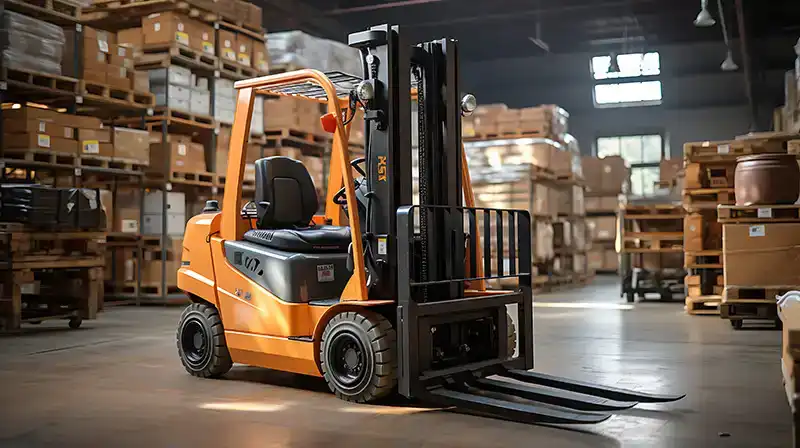
Service and hire businesses — such as forklift truck maintenance and hire operators — use it to manage both their own assets and those belonging to their customers. If your work involves assets of any kind, this platform is built for you.
Is Enterprise Asset Manager a CMMS?
Yes.
A CMMS (Computerised Maintenance Management System) is software used to plan, track and record maintenance work on physical assets and pro-Forms Enterprise Asset Manager covers this core CMMS functionality as part of a broader asset management platform.
You can log assets, set a calendar of planned preventative maintenance (PPM) dates using built-in PPM software, raise work orders, and record completed inspections and repairs against each asset’s history the same capability people are typically looking for when they search for CMMS software.
Where Enterprise Asset Manager goes beyond a traditional CMMS is in combining that maintenance management with a full asset register, compliance evidence, QR/NFC/AI-powered asset identification, and if you add WORK MANAGER complete field service scheduling for engineers carrying out the work. So if you’re comparing CMMS software options, Enterprise Asset Manager is built to cover that need and more — combining core maintenance tracking with compliance evidence and mobile inspections in one platform.
See our dedicated CMMS software page for the full feature breakdown.
What types of assets can I manage with the system?
You can track virtually any asset type, because the system supports fully custom fields and custom datasets for each asset category. This means the data you capture can be matched precisely to your real-world processes — your asset tracking solution fits around your business rather than forcing you into a rigid, one-size-fits-all template.
Fixed assets are typically items of machinery or equipment that are permanently installed in a particular location, such as a boiler, an access control panel, or an air conditioning unit.
Container assets are parent locations that hold other assets — for example, a room, a vehicle, a cabinet or a storage facility — and the system maintains a clear record of which assets are held within each container.
Consumable assets are items managed by quantity rather than individual serial number, such as stock bought in bulk. All three types can be managed within the same platform, giving you a single, consistent view of everything you own or maintain.
Is pro-Forms® suitable for asset owners who don’t just need field service management?
Yes.
pro-Forms® Enterprise Asset Manager works as asset owner software in its own right — the Base Plan is a standalone, browser-based asset register with no requirement to add field service or a mobile app. It’s built for asset owners, building occupiers, and equipment manufacturers who simply need to log, locate and evidence compliance for their assets from a desk. You can add mobile access or full field service management later if your needs grow, but neither is required to get started.
What makes pro-Forms® different from other UK EAM platforms?
Most enterprise asset management software UK vendors charge per asset or per user, which penalises growth.
pro-Forms® Enterprise Asset Manager has no limits on assets or admin users within the annual plan, so the platform scales from a single-site register to tens of thousands of assets across multiple locations without renegotiating cost. It’s also fully UK-hosted with UK data residency, GDPR compliant by design, and supports QR, barcode, NFC and AI-powered camera recognition for asset identification out of the box.
Can I access asset information in the office and on the move?
Yes.
The platform is designed to be used from both the office and the field without any compromise in functionality or data quality. Office-based staff — administrators, managers, compliance leads and surveyors — access the system through a secure browser-based login with no software installation required.
Field teams use the pro-Forms® mobile app, available on both Android and iOS smartphones and tablets. Updates made in the app — including inspection results, test outcomes, photos, signatures, notes and asset location changes — sync back to the cloud platform automatically, so every member of the team is always working from the same, up-to-date information regardless of where they are.
The app also works offline, queuing submissions locally on the device and syncing them once a connection is restored. This means engineers can continue capturing data reliably even in basements, remote sites or buildings with limited mobile signal, without any interruption to their workflow.
Where is the system hosted and where is my data stored?
The pro-Forms® Enterprise Asset Manager platform is hosted in highly secure, purpose-built UK data centres.
Your data remains in the United Kingdom at all times — including all backups — which means it never leaves UK jurisdiction.
This is important for organisations that need to satisfy UK data residency requirements as part of their procurement, governance or compliance policies, particularly those working in regulated sectors, public sector supply chains or with clients who specify UK-hosted solutions as a contractual requirement.
Keeping data onshore also simplifies your GDPR obligations, removing the need to consider the additional safeguards that apply when personal data is transferred outside the UK.
The platform is developed, maintained and supported entirely by our UK-based team, so there are no third-party international hosting dependencies to manage. If you need to provide your IT, legal or procurement team with detailed documentation about our hosting arrangements and data handling practices, our support team is happy to provide this.
How do you keep our asset data secure?
Security is built into every layer of the platform, not added as an afterthought. System databases are encrypted as standard, with the option to enable field-level encryption for particularly sensitive data captured through online or mobile forms — useful where asset records include personal information, safety-critical measurements or commercially sensitive data.
Browser-based access for admin and office users uses 256-bit encryption, and Two Factor Authentication (2FA) is available for all admin accounts to add an additional layer of protection at login.
The pro-Forms® mobile app uses AES 128-bit encryption as standard, protecting data stored on or transmitted from the device itself. Where file transfers are required as part of an integration or data export, Secure SFTP is available.
The platform is fully GDPR compliant and is developed, hosted and supported entirely within the United Kingdom. If your IT or compliance team requires formal security documentation to complete a supplier assessment, our team can provide this on request.
Are there limits on the number of assets or users?
No.
Within the annual plan charge there are no limits whatsoever on the number of system admin users you can create, nor on the number of assets you can add to the register.
You can start with a small, focused asset register covering a single site or asset type and expand it over time to cover multiple sites, a wider range of asset categories or a larger number of users — all without any renegotiation of your plan or unexpected cost increases.
This makes Enterprise Asset Manager genuinely scalable: it works as well for an organisation managing a few hundred assets as it does for one managing tens of thousands across multiple locations.
It also means there’s no pressure to limit the number of staff who have access to the system, so you can give view or admin access to everyone who needs it — engineers, managers, surveyors and office staff alike — without it affecting your costs.
Does the software support QR codes, barcodes and NFC for asset tracking?
Yes.
Enterprise Asset Manager supports QR codes, barcodes and NFC tags for identifying and tracking assets in the field, giving you the flexibility to choose the tagging method that best suits each asset type, environment and use case. QR codes and barcodes are cost-effective and easy to apply to most assets — they work well for tools, equipment, panels, meters and fixed installations.
NFC tags offer a tap-to-scan experience without needing line of sight, making them well suited to assets in cabinets, plant rooms or other locations where scanning might otherwise be awkward. Field users simply scan a tag using their Android or iOS mobile device to instantly pull up the correct asset record.
From there they can complete inspection or test forms, record results, add photos, update the asset’s location or view its full history — all in a few taps.
The app also includes AI-powered camera recognition for identifying assets without a physical tag.
Can I manage compliance inspections, tests and maintenance schedules?
Yes.
Managing compliance is one of the core purposes of Enterprise Asset Manager, and the platform gives you everything you need to plan, record and evidence asset inspections, tests and scheduled maintenance activities.
You can set a calendar of key dates and deadlines for each asset type — for example, annual gas safety checks, quarterly fire extinguisher inspections, or monthly plant equipment safety checks — with visual countdowns and automated reminders so nothing is missed.
Field teams capture results on site using mobile forms, attaching photos, measurements, pass/fail outcomes and signatures to each record. Every completed inspection or test is stored against the relevant asset, creating a full, timestamped audit trail that is available immediately from the office or in the field.
This makes it straightforward to demonstrate compliance to regulators, insurers, clients or auditors at any point, without having to search through paper records or piece together data from multiple spreadsheets.
My tools and plant regularly move between sites, does the system support check-in/check-out?
Yes.
Enterprise Asset Manager includes a built-in check-out and check-in feature specifically designed to manage assets that move between locations.
When an asset is checked out, you can record the destination site, the expected return date, the condition of the asset at the point of departure and the name of the person responsible for it. When the asset is returned, it is checked back in and the record is updated accordingly.
The location of each site is mapped within the system, and a full list of all assets currently logged to that site is always available, so you have complete visibility of where every asset is at any given moment.
The full movement history for each asset is also retained, giving you an auditable record of where it has been, who has had it and when it was returned — useful for insurance purposes, loss prevention, and demonstrating due diligence around asset management.
Can I manage hired assets?
Yes.
The system is designed to handle both directions of asset hire within the same platform, making it suitable for businesses that hire equipment out to customers as well as those that hire equipment in from suppliers for use within their own operations.
For assets you hire out, you can record customer details, on-hire dates, expected off-hire dates and asset condition at the point of departure and return.
For assets you hire in from a supplier, you can track the supplier, the hire period, the cost and the location where the asset is being used.
Both types sit within the same asset register and can be managed alongside your own permanently owned assets, giving you a single, unified view of your entire asset base regardless of ownership status.
On-hire and off-hire forms can be completed digitally using the mobile app, capturing photos and signatures at the point of collection or delivery to create a clear and defensible record of asset condition.
What reporting is available?
Enterprise Asset Manager provides practical, day-to-day reporting across your entire asset register, giving you the visibility you need to manage asset condition, compliance status, maintenance activity and lifecycle milestones without having to export data into spreadsheets or build reports manually.
Standard reporting covers asset listings by type, location and status, upcoming and overdue compliance dates and deadlines, inspection and test histories for individual assets, check-in and check-out activity, and asset movement between sites.
Because each asset type can include multiple custom datasets with fields defined by you, the system can also report on the specific measurements, readings, ratings and outcomes that are meaningful to your organisation and your particular compliance requirements.
Reports can be filtered and viewed from the browser-based admin interface and are available to all admin users without restriction. If you need to share compliance evidence with a client, auditor, insurer or regulator, the relevant records and history can be accessed and presented quickly and clearly.